VUGLogo

SWOVUG Registration now open

Just a quick post: registration is now open for the inaugural Southwest Ontario Veeam User Group meeting on Thursday, March 3rd 2016. You can register for the event here: https://go.veeam.com/user-groups.html I have some basic details in my previous post, but if you have any questions or comments, please do not hesitate to hit me up on Twitter ( @MattThatITGuy), by email (matt AT 42u.ca) or via a comment on this post.

February 2, 2016 · 1 min · matt
Veeam

Save the date: Inaugural Veeam UG Meeting

As I mentioned in a post a little while back, I am super excited to get the Southwest Ontario Veeam User Group (SWOVUG ?) rolling. It has taken some time to coordinate schedules and locations, but we have our first meeting scheduled for Thursday March 3rd. Full details: Where - Waterloo Memorial Recreation Complex / Room 200 Date - Thursday March 3rd, 2016 Time - 11 AM - 2:30 PM (lunch will be provided) ...

January 26, 2016 · 2 min · matt
VeeamSoBR-08

Step By Step: Creating a Scale-out Backup Repository in Veeam 9

One of the newly introduced features in Veeam Backup & Replication 9 is Scale-out Backup Repositories (SoBR), and frankly I have been waiting to try this out. This is a fantastic solution that will be welcomed in a lot of environments, large and small. The concept behind it is that many of us have small ‘islands’ of storage - maybe a SAN, some NAS storage, and / or some direct-attach somewhere. Previously it would have been a real pain to leverage all of these as you would have to setup a separate repository for each ‘island’ and then maintain the jobs to make sure that a) there will be enough space and b) keep track of what is going where. ...

January 14, 2016 · 5 min · matt
VeeamV9Installer

Veeam V9: First Impressions & 3 Awesome Features

After much anticipation, Veeam V9 was released earlier today. Normally I would hold off before installing a new upgrade, however after using Veeam for years now, I know they have some great QA, and in this case the benefits of the new features outweigh the risk for my environment. There are lots of places to find details about what is in Veeam 9 (including this blog), but I wanted to highlight a handful of the features that will have an immediate impact on my environment. ...

January 12, 2016 · 4 min · matt
VeeamUG

Where have I been? Starting a community.

December has been an abysmal month for my blogging; this actually marks the first post of the month, and I thought I owed it to at least myself to write up a post as to what has been going on. First off, lots of holiday stuff. My wife and I are of different religious backgrounds, both of which have holidays in December. Combine that with a couple of kids, and all of a sudden you have a bazillion family events to attend. Good news is that they are generally a great time, the kids are kept occupied for a bit, and the adults get to catch up. On the plus side, my kids have received lots of Lego which gives me an excuse to play with it again (see image). ...

December 15, 2015 · 3 min · matt
veeamIR03

Restoring vCenter with Veeam's Instant Recovery

I’ve been a long time user of Veeam, and something that sold me on it almost immediately was its Instant Recovery feature. For those of you who are unaware, Instant Recovery allows you to mount a VM from a backup (while writing changes to a delta file, thus leaving the backups ‘pristine’) without the need to copy the full VM back into production. This means that you’ll get a pretty quick turnaround on recovery - think minutes instead of an hour or more for larger VMs. ...

October 16, 2015 · 4 min · matt
2015-09-veeam-Error3

Veeam Error: [Warning] XXX all stuck VM snapshot consolidation attempts have failed

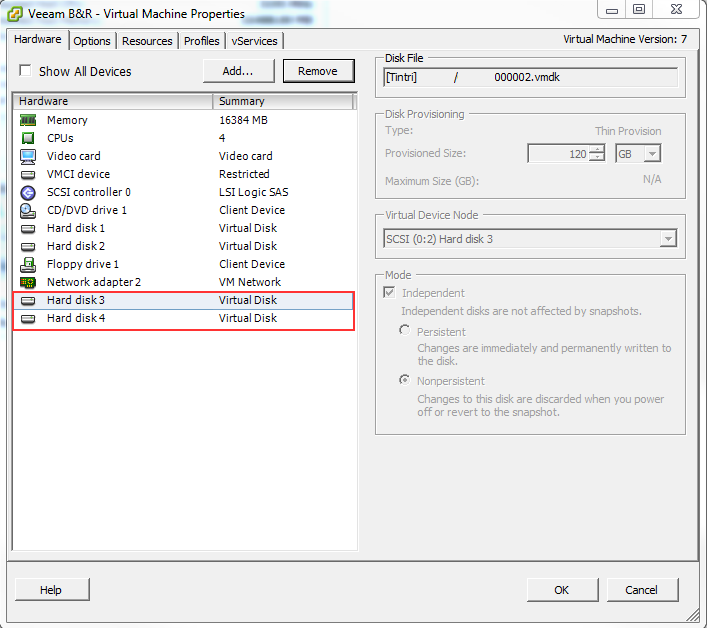
I recently ran into an interesting error with Veeam, one which I haven’t seen before despite using it for years. The error in question: [Warning] XXXX all stuck VM snapshot consolidation attempts have failed (where XXXX is the VM name). Veeam has been pretty good at removing the snapshots for awhile now, especially since they introduced their Snapshot Hunter feature in v8, so I was a little surprised to see an error such as this. The first thing I did was try and consolidate the snapshots via the vSphere client but I ended up getting the ever so helpful error “An error occurred while consolidating disks: msg.snapshot.error-DISKLOCKED.” Great, at least now I could confirm the disk was being locked by something. ...

September 25, 2015 · 3 min · matt
VMW-LGO-CERT-PRO-6-DATA-CTR-VIRT

My VCP 6 Journey

A few of months ago I started receiving emails from VMware reminding me that my VCP 5 was going to be expiring. With the changes that were introduced last year, I definitely did not want my certification to expire as it would result in me needing to not only sit two full exams, but to also attend an authorized class again ($$$). Luckily I’m able to take advantage of the Delta exam (2V0-621D) for existing VCPs. It is comparable to the full exam, except it is slimmed down (65 questions) and I believe there are a couple of areas not tested (although I can’t seem to confirm that anywhere online). The Delta exam was offered as a beta for a while, however I ended up not going through with it - mainly because kids are an incredible time sink, and before I knew it the Beta period was wrapping up. ...

September 19, 2015 · 6 min · matt
veeamFeatures

Veeam V9 Preview @ VMWorld 2015

One of the sessions I attended at VMWorld was a Veeam V9 technical deep dive. As a Veeam customer for about 5 years now I have seen quite a few improvements, but I think V9 will be one of their biggest updates to date. Some of the features that were introduced were: Veeam Cloud Connect Replication - Currently Veeam Cloud Connect is a baked-in extension that allows you to automatically backup to hosted 3rd party repositories. This was implemented as an easy way to get your backups offsite, but with the replication feature there is a fail-over component. It is no longer just a backup repository, but a way to have your VMs running in the cloud in the event of a failure. No VPN is require - all traffic is sent over SSL / TLS; Direct NFS Access - This feature allows Veeam to talk directly to NFS storage, bypassing the need to talk to the hypervisor. This should cut down on the amount of ‘chatter’ required during backups and should result in quicker backup times. This is one feature I am looking forward to testing; NetApp SnapMirror and SnapVault integration - Although I no longer run NetApp in production, I thought this was a cool feature. Veeam already has NetApp snapshot integration (i.e. It backs up the machines via a snapshot on the filer instead of running a snapshot against the VM), but this could allow you to run backups from your secondary storage, thus decreasing storage IO demands even more (and possibly allowing you to do your remote backups from a remote snapshot); Per-VM backup file chain - In order to get better dedupe rates, this option (available via a checkbox) will store each VM in a backup job as its own file. This might make managing backup files easier as well; Veeam Explorer for Oracle - I don’t use Oracle, but it is interesting to see a new Explorer being added to the family. Also of note is that this works for the Windows & Linux versions; Veeam Explorer for Active Directory - You can now recover GPOs (yay!), AD Integrated DNS records (yay!), and an ’experts only’ feature to recovery configuration partition records; Veeam Explorer for MS SQL - You can now do table level recovery (assuming there are no dependencies), SQL Objects (e.g. Triggers, stored procedures, etc.) as well as the ability to use a remote SQL Server for staging; Standalone Console - The console can now run on a Windows desktop - no longer need to RDP to the Veeam server; Direct File Restore - If the Veeam server is located in site A, but the repository and destination server are in site B, Veeam will now restore the file without the need to send all the traffic back to site A. This could have a huge impact with regards to remote file restores; BitLooker - Suppose you have a 1 TB VMDK and you delete 500 GB. Because those files still exist in the OS, your backup files won’t shrink. This feature goes through and analyzes the NTFS MFT to identify deleted data and exempt it from the backup and/or replication; Useless Data - The ability to exempt folders and files from backups. A good use case is a general purpose share where folks dump scans from photocopiers; Scale-out Backup Repository - This will be a huge feature in some environments as it introduces the ability to make storage pools out of various islands of storage. It is designed to scale out in terms of storage, as well as performance (i.e. write to multiple nodes at once). Overall the Veeam session was probably one of the highlights for me. Seeing all of these new features that are coming down the pipeline shortly has definitely caught my eye for a quick upgrade. ...

September 7, 2015 · 4 min · matt